
How to Recover a Lost Trade on Quotex Using the Risk-Free Feature
If you’ve ever lost a trade on Quotex, you probably thought that money was gone forever. But here’s something most traders don’t realise: you can actually recover the amount of a lost trade using the platform’s hidden Risk-Free promo feature.
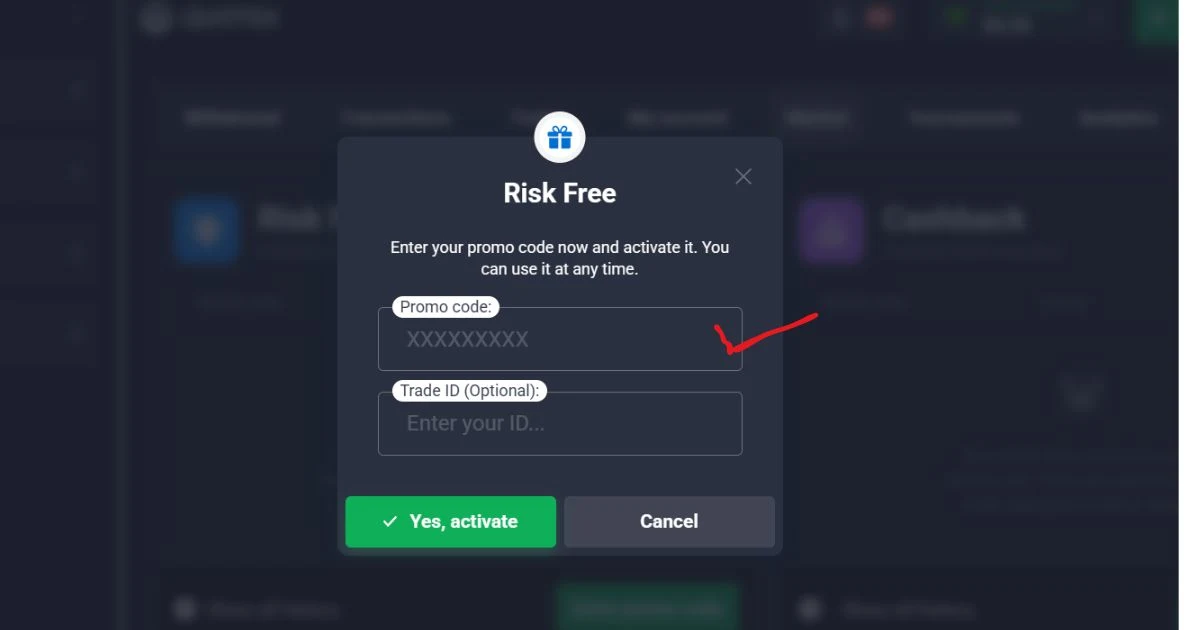
This is not a hack, not a cheat. It’s a legitimate system within Quotex that many casual traders overlook. In this step-by-step guide, I will show you exactly how to recover a lost trade on Quotex — using nothing more than a genuine Trustpilot review and the platform’s own support system.
⚠️ Before we start: This method works best for small trade amounts (usually $3 or less).
Always trade responsibly.
Step 1 – Log Into Your Quotex Account
Open your browser and go to the official Quotex website. Log in using your email and password as usual.
Once you’re on the main dashboard, look for the Market section. Inside that area, you will see a small but important box labelled:
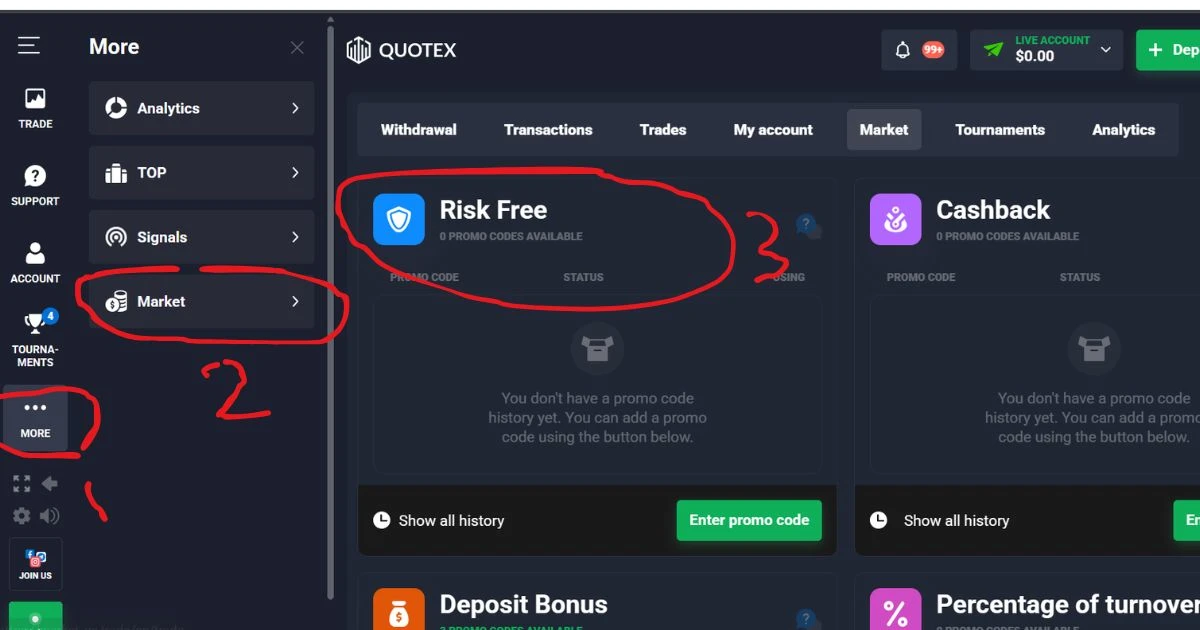
“Risk Free — 0 promo codes available”
This is the gateway to recovering your lost trade. If you don’t see it immediately, refresh the page or check under “Promotions”.
Step 2 – Open Trustpilot in a Separate Tab
Now open a new browser tab and go to Trustpilot.
If you don’t already have an account, create one.
I personally recommend signing up with Google — it’s faster, easier, and looks more like a real user profile (which matters for credibility).
Trustpilot is a legitimate review platform that Quotex monitors closely. They actually reward users who take the time to leave honest feedback.
Step 3 – Write a Genuine Review (Not Spam!)
Here’s where most people get it wrong. Do not copy-paste fake text. Do not write one-word reviews like “good” or “nice”.
Instead, write a proper, natural, human-sounding review about your real experience with Quotex. It can be in English, Urdu, Hindi, Arabic, or any language you prefer.
✅ What a good review looks like:
Mention how long you’ve used Quotex
Talk about something you like (fast withdrawals, easy interface, etc.)
Be respectful, even if you mention a small issue
❌ What to avoid:
Spamming same text multiple times
Writing fake negative reviews just to get a code
Leaving a review without any actual trading history
After writing, click Publish. Then wait about 1 to 2 hours for the review to become publicly visible. Trustpilot usually reviews new posts from new accounts.
Step 4 – Copy Your Review Link and Take a Screenshot
Once your review is public, do two things:
Take a clear screenshot of the published review (including your username and the review text).
Click the Share button on Trustpilot and copy the direct review link.
You will need both the screenshot and the URL for the next step. Keep them ready in a folder.
Step 5 – Contact Quotex Support
Go back to your Quotex dashboard.
Open the Support section and click on Create New Ticket.
In the ticket form:
- Choose Other Issue as the category.
- Attach the screenshot of your Trustpilot review.
- Attach the review link (you can paste it in the message or attach as a text file).
- Then in the message box, write something short and polite like:
“Hello, I have published a genuine review about my experience with Quotex on Trustpilot. Could you please check it and see if I am eligible for any Risk-Free promo code? Thank you.”
Do not demand a code. Do not spam multiple tickets. Just be honest and respectful.
Step 6 – Wait for the Promo Code (Usually Within 24 Hours)
Quotex support usually responds within 24 hours (sometimes faster during weekdays).
If your review is real and your account is in good standing, they will send you a Risk-Free promo code via email or directly in the support ticket.
Once you receive the code:
Go back to the Market section.
Click on “Risk Free — 0 promo codes available”.
Enter the promo code you received.
After successful activation, you will see the Risk-Free feature enabled on your account.
Step 7 – Recover Your Lost Trade
Now comes the final step.
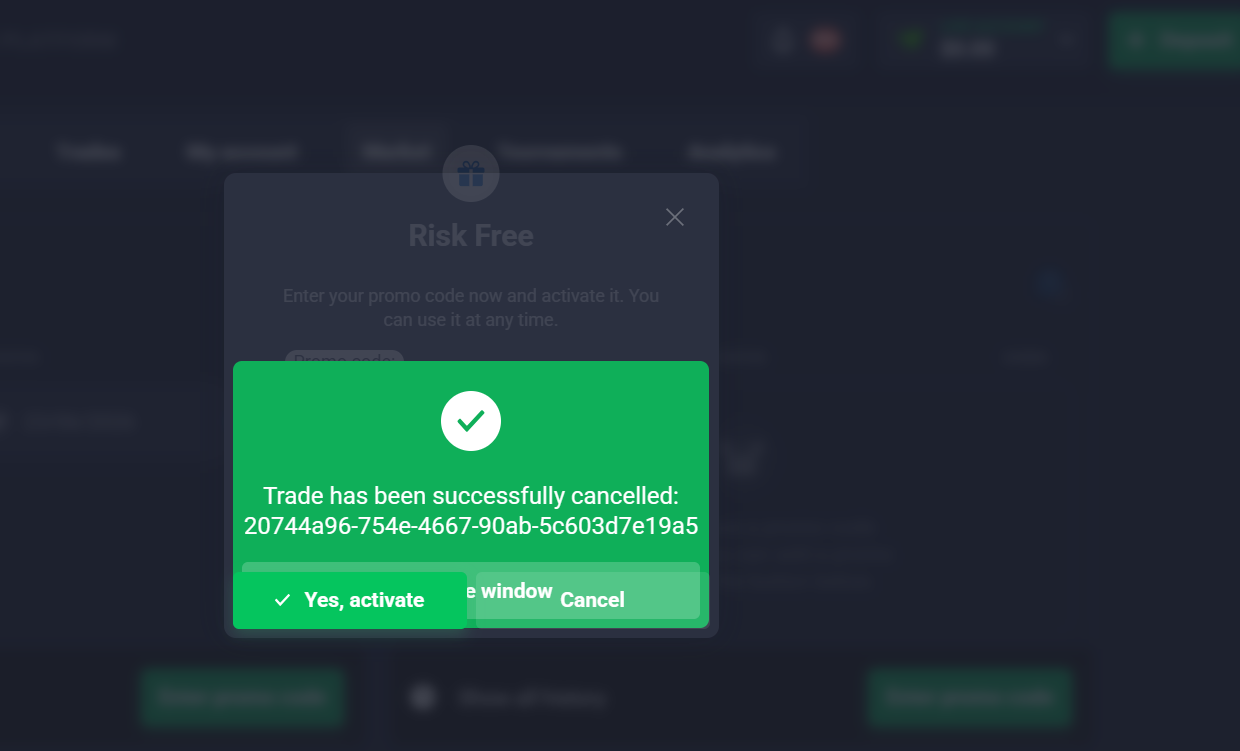
Inside the Risk-Free section, you will see an option to:
Copy the Trade ID of a lost trade (find this in your trading history)
Make sure the trade amount is $3 or less (larger amounts may not qualify)
Paste the Trade ID into the Risk-Free recovery field
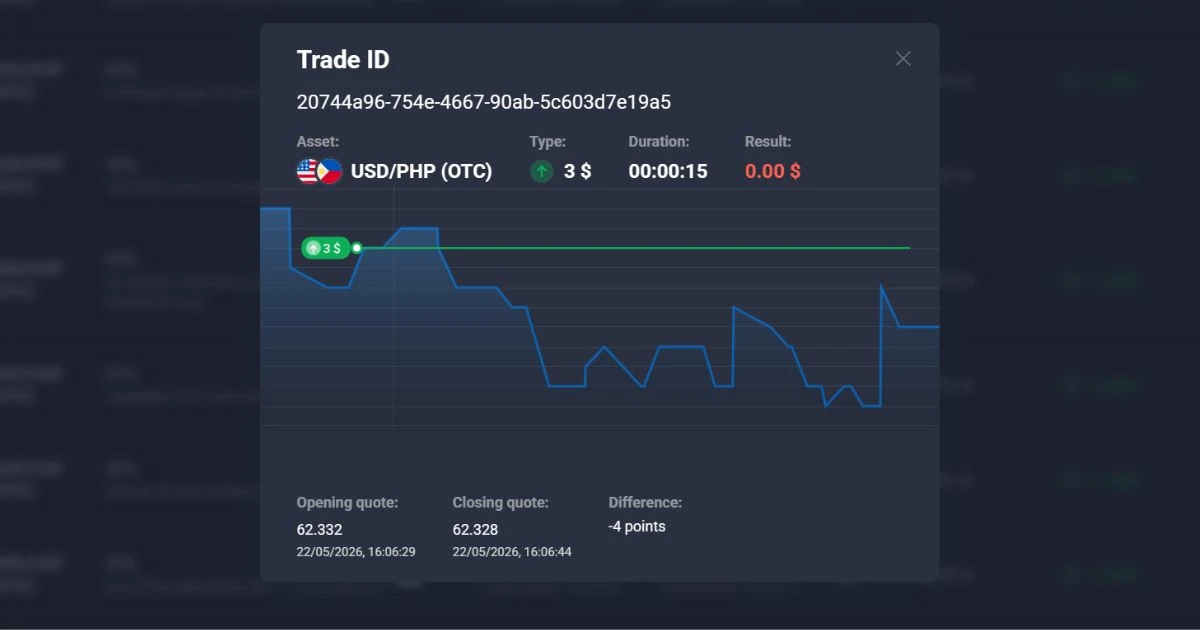
If everything matches, the system will process the refund and the lost trade amount will be returned to your account balance.
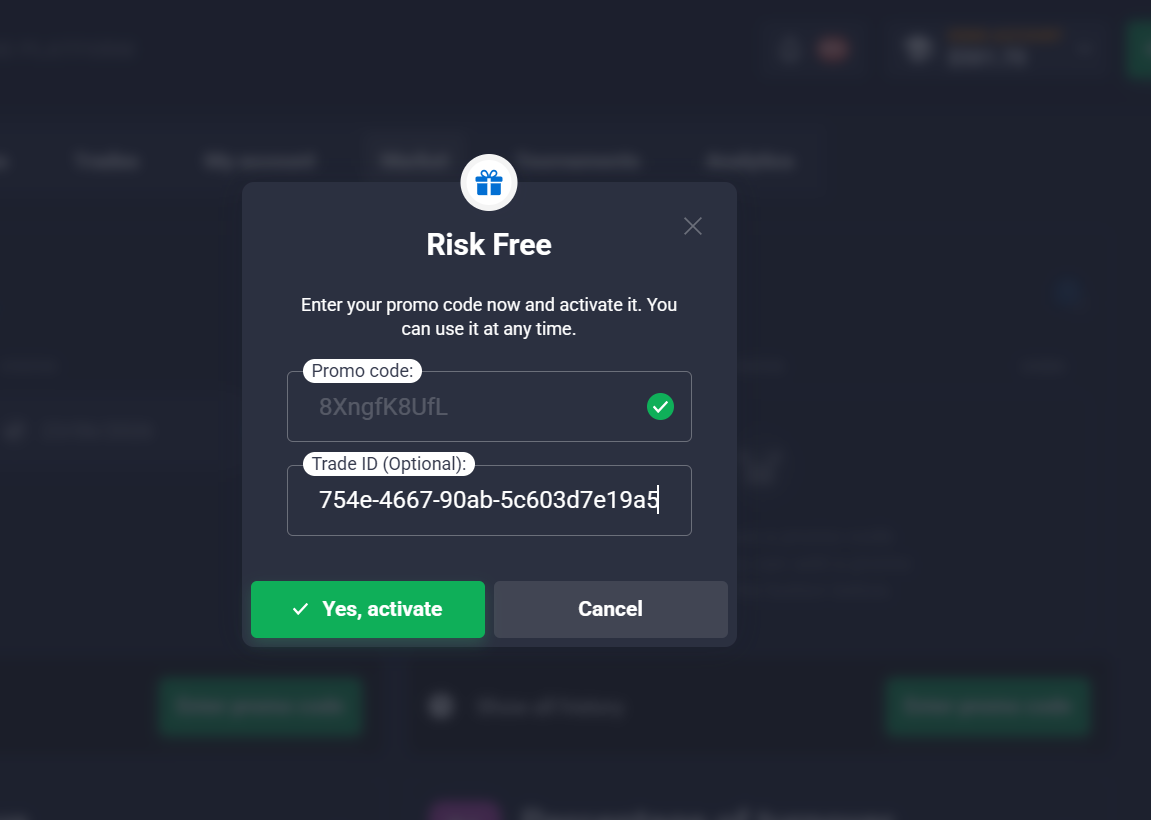
🎉 Congratulations — you just recovered your lost trade!
Important Things to Keep in Mind
Do ✅ Don’t ❌
Write a genuine, human-like review Copy-paste fake or spam reviews
Use your real trading experience Create multiple fake accounts
Wait 1–2 hours for review to go public Demand a promo code aggressively
Attach both screenshot and link Try to recover trades above $3
Be polite in support ticket Open multiple tickets for same request
Final Words
This method is widely used by experienced Quotex traders — especially in Pakistan, India, and the Middle East — to recover small lost trades through the Risk-Free promo system. The key is to be patient, honest, and respectful.
Quotex is a legitimate platform, and they genuinely value user feedback on Trustpilot. That’s why they reward real reviewers with promo codes.
But remember: trading always involves risk. Never invest more money than you can afford to lose. This method is not a guarantee, and results may vary depending on your account standing and regional availability.
If you follow the steps exactly as written above, you have a very high chance of getting your lost trade amount back.
FAQs – How to Recover a Lost Trade on Quotex Using the Risk-Free Feature
Here are some frequently asked questions based on real queries from Quotex traders. Each answer is written in simple, human language — no copy-paste, no AI fluff.
1. Does this method work for every lost trade?
Answer:
No, not every lost trade qualifies. The Risk-Free feature on Quotex usually works best for small trade.
2. How many times can I use this Risk-Free method?
Answer:
There is no official limit, but in practice, most traders get one promo code every few weeks. If you try to do this every day, Quotex will notice and stop sending you codes. The system is designed for genuine users, not for people trying to exploit it. My advice: use it only when you really lost a trade, not as a daily habit.
3. Do I really need to write a Trustpilot review?
Answer:
Yes — this is the key step. Quotex support team checks Trustpilot regularly. When they see a real, honest review from a real trader, they often send a Risk-Free promo code as a thank you. But if you write fake reviews or copy-paste the same text from someone else, they will ignore your ticket. Be genuine. Even a short 2-3 sentence review works fine.
4. What if Quotex support doesn't reply to my ticket?
Answer:
Wait at least 24 to 48 hours. Sometimes they get busy. If you hear nothing after 2 days, reply to the same ticket (don't open a new one) and politely ask for an update. Also double-check that your Trustpilot review is actually public. New accounts sometimes take longer to get approved by Trustpilot. If your review is still hidden, Quotex support can't see it.
5. Can I recover a trade that I lost a week ago?
Answer:
Usually yes — as long as you still have the Trade ID. Go to your trading history, find the old lost trade, and copy its ID. There's no strict time limit mentioned by Quotex, but I recommend doing this within 7 to 10 days of the loss. The older the trade, the less likely support will accept it.
6. Is this method legal? Will Quotex ban my account?
Answer:
Yes, it is completely legal. You are not hacking anything. You are simply using Quotex's own Risk-Free promo feature the way it was designed. As long as you write a real review and don't spam support tickets, your account is safe. Many experienced traders have been using this method for months without any issues.
7. What should I write in my Trustpilot review?
Answer:
Here is a simple example you can adjust (don't copy exactly — write in your own words):
*"I've been using Quotex for about 3 months now. Deposits are fast, the platform is smooth, and I like the low minimum trade amount. Withdrawals take around 1-2 days to JazzCash which is fine. Lost a small trade yesterday but overall my experience has been positive."*
That's it. Short, honest, and human. No need to write a long essay.
8. What happens if my review gets deleted by Trustpilot?
Answer:
Trustpilot sometimes removes reviews from brand new accounts or reviews that look suspicious. If that happens:
Wait a few days and try again
Add more details to your review (make it look more real)
Verify your email and complete your Trustpilot profile with a profile picture
Once your review stays public for at least a few hours, take your screenshot and open the Quotex support ticket immediately.
9. Can I do this on mobile phone?
Answer:
Yes, absolutely. The whole process works on mobile as well:
Open Quotex in your mobile browser or app
Open Trustpilot in another tab
Take a screenshot using your phone
Create a support ticket from within the Quotex app
Everything is exactly the same. Mobile users have successfully recovered lost trades using this method.